If you do not know a neighbor's email address, you can ask Nextdoor to send them a postcard through the U.S. Mail. Nextdoor lets you send up to five postcards each month.
To invite neighbors by postcard:
Click near the top right corner of the home page.
On the menu that drops down, click Postcards. A “Send postcard invitations” page will come into view:
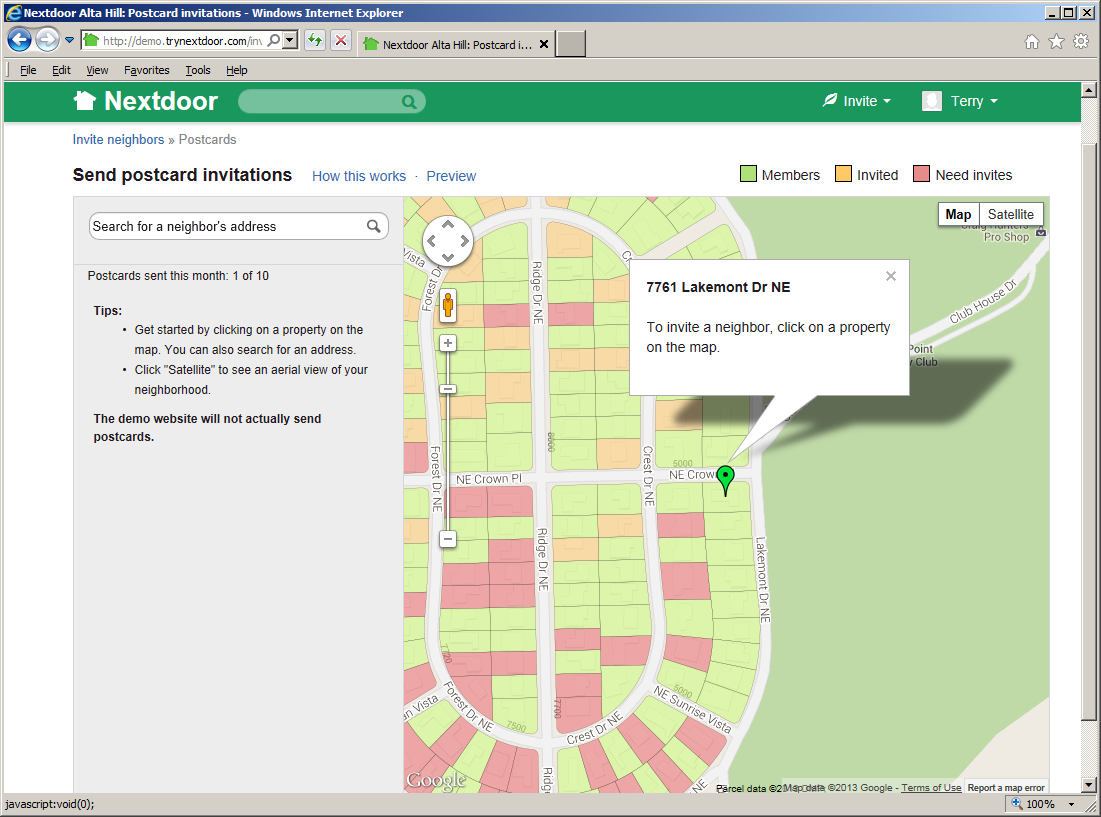
The page includes a map of the neighborhood.
The map uses different colors to show which neighbors are Nextdoor members:
Addresses shown in green are where Nextdoor members live.
Addresses shown in red have no Nextdoor members.
Addresses shown in pale orange have no Nextdoor members but were sent an invitation to join Nextdoor.
Make a list of the addresses where you want Nextdoor to send postcard invitations:
If you click an address shown in red, Nextdoor will add that address to the list.
If you click an address shown in pale orange, Nextdoor will show:
the street address you clicked
which Nextdoor member sent an invitation to that address
the date when the Nextdoor member sent an invitation to that address
an Invite them to join link
If you click an address shown in green, Nextdoor will show:
the Nextdoor member or members who live at that address
an Invite them to join link
You can type all or part of an address in the Search for a neighbor's address box near the top left corner of the page. If the information you type agrees with an address in your neighborhood, a list of addresses will drop down. Click the address that you want.
If that address is not shown in red on the map, Nextdoor will show some information about the address.
If you see a form that contains an Invite them to join link, a Nextdoor member has sent an invitation to that address. Or one or more people at that address are members of Nextdoor. You do not need to send an invitation to this address, but you can if you want to.
Note
If you sent a postcard invitation to this address in the last 60 days, Nextdoor will not let you send a second invitation.
If you want to send a second postcard invitation to the address:
Click the Invite them to join link. A form that shows the address, a Name box, and a Unit box will come into view.
If you know the name of a neighbor at that address, click in the Name box. Then type the neighbor's name.
Click the gray button.
Note
To remove an address from the list, move the mouse cursor on top of the address on the list. A gray X will come into view to the right of the address. Click the X.
Read the message in the Enter a message box.
If you want, you can change the message:
Click in the Enter a message box, then use the <Delete> and/or <Backspace> keys to delete the message. Type the message you want to use.
To use a message that Nextdoor wrote, click the Use default message link at the right side of the Enter a message box.
If you sent invitations in the past, you can click the Use message from last time link to use the same message again.
To send the invitations, click the green button.
Note
To not send invitations, go back to the home page.
Nextdoor will send an invitation to the neighbor by postcard. It is typical for neighbors to receive their postcard three to five days after you send the invitation.