If one or more future events are scheduled, you will see information about each event:
the date and time of the event
a short description of the event (such as “Patio Party”)
the name of the person or organization that will host the event
at the right side of the page, numbers that show:
how many neighbors will be at the event
how many photos of the event are posted
To see more information about an event, click the event description. A page with more information will come into view:
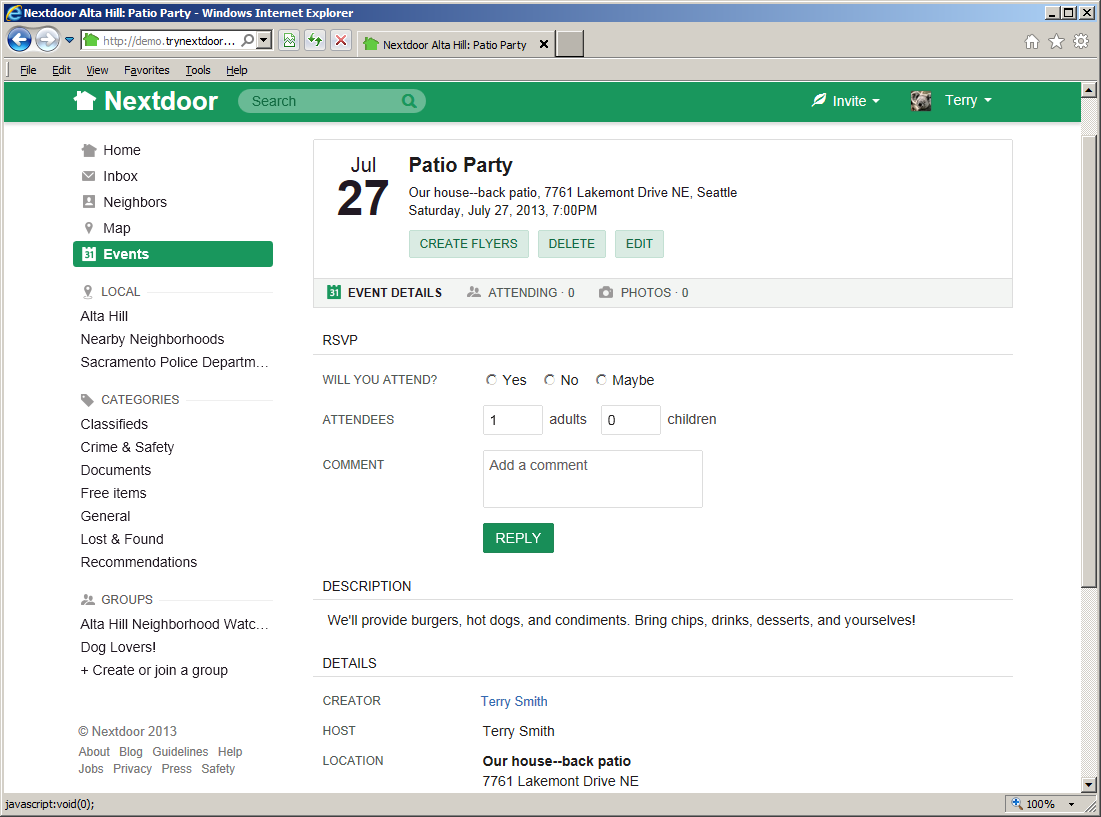
Use the links below the event description to see more information about the event:
EVENT DETAILS: Click the EVENT DETAILS link to see full information about the event.
ATTENDING: Click the ATTENDING link to see a list of neighbors who will be at the event.
PHOTOS: Click the PHOTOS link to see photos related to the event.
To tell the neighbor who scheduled the event if you will be there, complete the “RSVP” section of the page:
To the right of WILL YOU ATTEND?, click Yes, No, or Maybe.
If you click Yes or Maybe, you can tell the neighbor how many people from your address will be at the event. Click the the adults box and type a number. If one or more children will be at the event, click in the children box and type a number.
If you want, you can add a short message (such as
We will bring chairs!) that the neighbor will see. Click in the Add a comment box, then type your message.Click the green button.
Note
To change your reply, you can click the Change your reply link in the “RSVP” section of the event page.